Overrides
An override is a change made on an instance, or on a layer inside it, that replaces the main component's value for that instance only. This page covers what an instance can change, how to undo a change, and what survives a swap or a variant switch.
How overrides work
- A property without an override follows the main component; an overridden one keeps the instance's value. Which properties accept one: What an instance can override.
- Overrides are kept per property, with one exception: the content of a text layer and its character styling are one override. Changing the weight of one word also stops the text from following the component's wording.
- The structure inside an instance is locked: you can't add, reorder or move layers, except inside a slot. Pressing
Deleteon a layer inside an instance hides it, which is a visibility override. - To change structure, edit the main component: right-click the instance or a layer inside it → Go to source object, or click the Go to main component button in the Properties panel header.
- A property bound to an input is locked on the instance: change the input row instead. An override wins over a value bound to a variable (overrides and bindings).
Seeing and resetting overrides
Where: Properties panel, with one instance or one layer inside an instance selected.
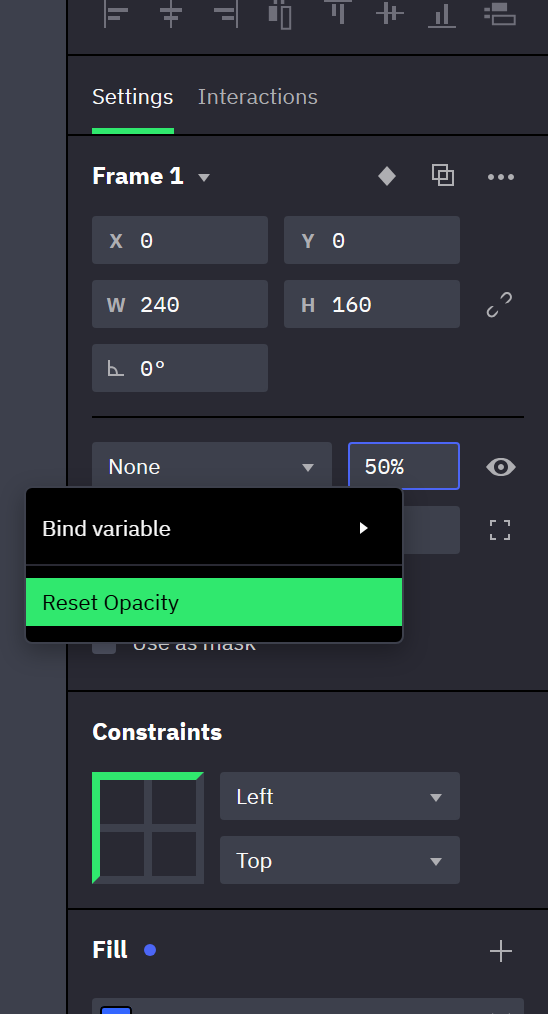
Indicators
- An overridden field has a blue border; in a row of buttons, the selected button has it.
- A blue dot follows the title of a section whose list is overridden (Fill, Stroke, Effects, Highlight) and the label of an overridden checkbox.
- Indicators show only while exactly one layer is selected. A purple outline means something else: the property is bound.
Resets
More actions below is the button in the Properties panel header.
| Reset | Where | Clears |
|---|---|---|
| Reset plus the field's name, such as Reset Opacity or Reset Fills | Right-click an overridden field, its label or its section title, with one layer selected | That property. On a text layer's content and character styling it reads Reset Text & Styling and clears both. |
| Reset overrides | More actions, with layers inside an instance selected, nested instances included; never for a top-level instance | Every override on each selected layer. Layers inside them keep theirs. |
| Reset name | More actions, one top-level instance selected | A manual rename; the name follows the component again. |
| Reset size | Same | A manual size (Instance size). |
| Reset inputs | Same | All assigned input values and the variable bindings on the rows (assigning inputs). |
| Reset all changes | Same | All overrides on the instance and on the layers inside it, the input values, and a manual name and size. |
A bound property offers no Reset, only its unbind entry.
Instance size
Where: Properties panel header → More actions → Reset size.
An instance follows the size of its main component — width, height, minimum and maximum size, sizing mode — until you give it a size of its own. Its name follows the component's name until you rename it.
- The instance stops following when you resize it, type a width or height, set a minimum or maximum size, change its sizing mode or its Flex grow factor, or scale it with the Scale tool. A size change that layout causes, such as a Fill instance growing with its parent, doesn't count.
- Reset size clears all of these at once. Right-clicking an overridden size or sizing field offers the same reset, labeled by what is overridden, such as Reset Size or Reset Size and Flex sizing.
Swapping an instance
Where: select one or more instances → Properties panel header → click the component name.
- The header label of an instance is a dropdown of the document's components and component sets.
- Entries that would make a component contain itself are left out: for an instance that sits inside a component, the component itself and every component that nests it.
- Choosing a component set puts the instance on the first variant in the Layers panel. Within the current set, use Variant and State.
- With several instances selected, the list holds only what every selected instance can use. Instances that already belong to the chosen component or set keep their variant.
- What a swap keeps: Overrides across a variant switch.
Overrides across a variant switch
In the editor, choosing another Variant or State, or swapping the component, discards every override of the instance — on the layers inside it and on the instance itself. Four things stay: a manually set name, a manually set size, input values (which ones), and these settings of the instance itself: hidden, locked, Use as mask and the aspect-ratio lock. Use inputs for anything else that has to survive.
In preview, a component behavior changing state, or a Set Component Variant action, carries the overrides over to the new variant, together with the changes made during the session:
- An override moves to the layer with the same type and the same name, anywhere in the new variant.
- Several layers with the same type and name are matched by their order of appearance, so adding or reordering such a duplicate in one variant shifts the match.
- The text layer bound to Input value matches regardless of its name.
- A nested instance matches only when it also points at a component, or component set, of the same name.
A Reset action on the instance clears the session changes that a switch carried over.
Nested instances
Select an instance nested inside another instance to change it for that outer instance only.
- You can swap it from the header dropdown, change its Variant and State, assign its input rows and override the layers inside it.
- All of this is kept as overrides of the outermost instance. Reset overrides on the nested instance restores the component, variant and input values set in the main component; so does Reset all changes on the outer instance, while its Reset inputs does not.
- A nested instance can't be detached on its own (detaching).
Related
- Component inputs — per-instance values that survive a variant switch.
- Slots — instance-specific content inside a component.
- Variants and interactive states — component sets and states.
- How interactions run — an instance's own interactions are not overrides; object behaviors work the same way.
What an instance can override
The table covers layers inside an instance; the instance itself follows below. A locked field is disabled in the Properties panel. Fields without a visible label are named by their tooltip.
| Group | Overridable | Locked |
|---|---|---|
| Layer | Name, visibility (Toggle visibility) | Lock, Use as mask, order in the Layers panel |
| Position and size | — | X, Y, width, height, rotation, Constraints, aspect-ratio lock, minimum and maximum size |
| Appearance | Opacity, Blend mode, Corner radius and individual corners, Fill, Stroke, Effects | Clip content, Fill adjustments, Stroke adjustments |
| Stroke settings | Stroke width and individual sides, Stroke position, caps, Join, Miter limit, Dashes | — |
| Text | Content; font, size, line height, letter and word spacing, decoration, Highlight, fill; horizontal and vertical alignment; paragraph spacing and indent; text sizing mode; Oversized content | Content tag |
| Shapes | Oval sweep angle and inner gap, polygon corner count, star ray count and inner radius | Vector points and segments, a vector's corner radius |
| Item in a Flex or Grid container | Horizontal sizing and Vertical sizing (Fixed, Fill, Hug content), Flex grow factor, Auto margins, Horizontal alignment and Vertical alignment in a grid cell | Use absolute positioning; grid placement: Column, Row, Column span, Row span; order among the items |
| Flex or Grid container | Alignment, Packed / Space between, Spacing between children, Spacing between rows, Column gap, Row gap, padding and its lock, Reverse stacking order, Include borders in items size | Layout type, direction, Wrap children, Column count, Row count, Edit columns and rows, Layout helpers |
| Nested instance | Component (swap), Variant, State, input rows | Detaching it on its own |
| Interactions and behaviors | — | The Interactions tab and the Behaviors section are read-only |
| Structure | Content of a slot | Adding, reordering, moving, framing, flattening and outlining layers; adding or removing a layout |
- The size of a layer inside an instance changes only through its sizing mode, or when the Scale tool scales the instance: the scaled sizes and positions of its layers become overrides.
- A Fill override on a vector layer applies to all of its regions.
On the instance itself:
- Appearance, Clip content, padding, gaps, alignment, size and minimum and maximum size can be changed like on a frame, and each change is an override.
- Position, rotation, Constraints and the place in the Layers panel belong to the instance. They are not overrides, and no reset touches them.
- Locked: layout type, direction, Wrap children, Column count, Row count, Edit columns and rows, Layout helpers and the content tag. A layout can't be removed from an instance.