Component inputs
An input is a named, typed value that a component exposes so that each instance can set it without overriding layers. You need inputs when instances of one component differ in text, visibility, numbers or colors. Also called: component properties, props.
- Define the input on the component (→ Defining inputs).
- Bind it to a property inside the component (→ Bind a property).
- Assign a value on each instance (→ Assigning inputs on instances).
Defining inputs
Where: select one component or one component set → Properties panel → Inputs → Add input (the + button) → pick a type → New Input dialog → Name, Value → Add.
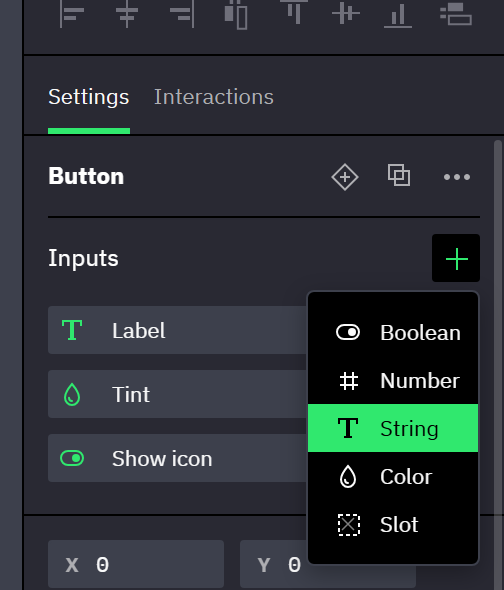
- The Inputs section appears only while exactly one standalone component or one component set is selected. A variant inside a set has none: select the set, whose inputs all variants share.
- The types are Boolean, Number, String, Color, Array and Slot, fixed once the input exists. Which property accepts which type: bindable properties.
- An Array input holds a JSON array, edited with the same JSON editor as an array variable (→ Arrays and objects). Only the Items of a Repeater inside the component can be bound to it, which lets each instance supply its own list (→ Array inputs).
- A String input can be Multiline: its value is then edited in a text area, in the input dialog, on instances and in a Set Component Input action, so it can hold line breaks. A text layer bound to it shows one paragraph per line. The mark changes only the control: a value keeps its line breaks when it is switched off.
- Value is the default. Every instance that assigns nothing uses it, and the main component itself shows it.
- A Slot input has no value: it names a place where instances hold their own content, and it never gets a row on instances.
- The type icon of an input is highlighted once a property is bound to it. Right-click the highlighted icon to list the bound layers and select one.
- A component that joins a set hands its inputs to the set, where inputs with the same name and type become one. A variant moved out of its set keeps its own copy of the set's inputs.
Component sets with a behavior add inputs marked Built-in: Checked for Checkbox, Radio button and Toggle, Option value and Selected value for Radio button, Input value and Placeholder text for Input, Text and Placeholder text for Textarea, Color for Color input, Value, Start, End and Step size for Slider, Selected value, Selected label and Placeholder text for Dropdown, and Label, Disabled and Kind, with Option value on an Option, for Option and Menu item (→ Component behaviors). They stay at the top of the list and can't be renamed or deleted. Among them, Checked, Selected value and, except on a Dropdown, Placeholder text are not offered under Bind input. A Dropdown's Selected label has no value of its own and no row on instances: it shows the label of the selected option (→ Dropdowns and menus). A Slider's Value reads as the nearest step between Start and End wherever it is shown (→ Value, Start, End and Step size). The two of a Textarea set are Multiline, those of an Input set are not, and the behavior decides it.
Assigning inputs on instances
Where: select an instance → Properties panel → the untitled block of rows at the top, directly below Variant and State when the instance has them. Each row carries the input's name.
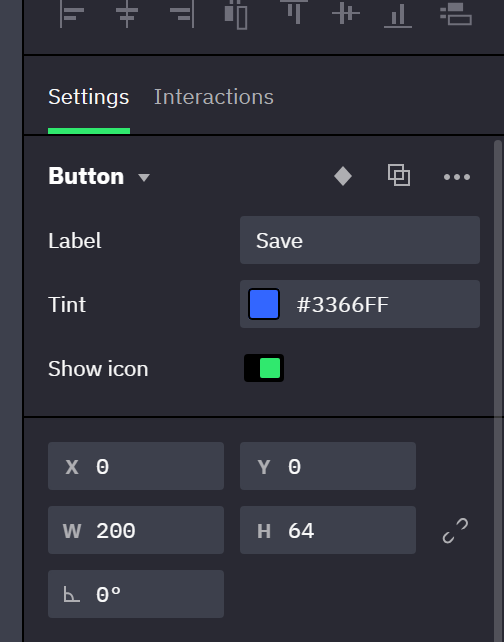
- A row appears only for inputs bound to at least one property, plus the built-in inputs. In a component set, the row appears on instances of the variants where the input is bound; in a set with a behavior, a binding in any state of the variant is enough.
- An unassigned row shows the input's default. An assigned value wins over the default on that instance. The row of an Array input shows the item count and opens the JSON editor.
- To change a property that follows an input, change the row: the property's own field is locked on the instance (→ Bound fields).
- A row can itself be bound to a variable, which locks the row (→ Instance inputs). On a control's built-in Checked, Selected value, Input value, Text, Color or Value the binding is two-way in preview (→ Two-way binding on controls).
- Assigned values survive a change of variant or state. After a swap to a different component, a value carries over to an input with the same name and type; the rest are dropped.
Several selected instances share rows only when all come from the same component or the same component set, and only for inputs every one of them shows. While the values differ the row shows a mixed state (Mixed in text and number fields), and an edit writes to all of them.
More actions (in the panel header) → Reset inputs clears all assigned values of one instance, together with the variable bindings on its rows.
Inputs and nested instances
An input reaches only the layers of its own component. The rows of an instance nested inside a component accept a value or a variable, not an input of the outer component.
- Inside the main component, select the nested instance and assign its rows; every instance of the outer component follows.
- Each variant of a component set is a main component of its own, so its nested instances can take their own values or variables. For an icon that changes color with the state, give the icon component a Color input that drives its fill, then bind the icon's row to a different variable in each state variant.
- On an instance of the outer component, do the same. The value wins over the one set in the main component and is stored as an override of the outer instance: Reset overrides on the nested instance clears it, Reset inputs on the outer instance does not.
- Binding a nested instance's rows to a variable works only inside the main component (→ Inside components and instances).
Renaming and deleting inputs
Where: Inputs section → click an input to open Edit Input (Name, Value, Update); right-click an input → Duplicate / Delete.
- Renaming breaks nothing: bindings, assigned values and Set Component Input actions follow the input, and the rows on instances take the new name.
- Deleting an input unbinds every property bound to it. Those properties keep the value they show in the main component — the former default — on every instance. Its row disappears from all instances, and Set Component Input actions that set it are left without an input.
Deleting a Slot input removes the content that instances hold in that slot. Undo brings it back.
Related
- Binding properties to inputs and variables — how to bind, and which property accepts which type of input.
- Binding rules and edge cases — paint replacement, color adjustments, what an unbound property keeps.
- Components and instances — components, variants and instances in general.