Debugging a prototype
Unexpected prototype behavior often comes from two features meeting: a variant that has no Click event, a layout that controls a layer's size, a preview session that keeps a changed value. Use the symptom table to find the rule, and the two consoles and the Variables panel to see what ran and what is incomplete. Also called: troubleshooting.
Find the cause by symptom
| What you see | Usual cause | Where the rule is |
|---|---|---|
| A Click on a component does nothing in preview | The event sits on the default variant only, and the instance shows :hover whenever a mouse clicks it | Events belong to a variant |
| Nothing scrolls | No frame is Scrollable, or the Scrollable inner frame is set to Hug content on the scrolling axis | Nothing scrolls by default, Scrollable |
| A frame drags but ignores the wheel and the trackpad | It is Pannable, not Scrollable | Pannable |
| Draggable has no effect | The layer is an item of a Flex or Grid frame, and the layout decides where it sits | With managed layout |
| A state variant never shows in preview | Its suffix is not a state of the set's behavior, such as :pressed for :active or :checked on a Button | Naming states, States per behavior |
| A state variant is missing from Change to | The set has a behavior, and the behavior switches the state variants | Set Component Variant |
| A checkbox, radio button or toggle starts in the wrong state | The starting state comes from Checked, on the set or on the instance's row | Checked and the starting state |
| Radio buttons do not uncheck each other | Their layer names differ, or they are not inside the same artboard | Radio groups |
| An input cannot be picked in Set Component Input | The input is bound to no property, or it is a slot | Set Component Input |
| Reset did not restore a variable | Reset covers one layer and never variables | Reset |
| Set Variable is listed as missing a variable | The variable was switched to an expression or deleted, which empties the action's Variable field | Changing or deleting a variable |
| An edit made in the editor does not show in an open preview | The session already changed that variable or that layer property, or the variable has a runtime value; it keeps its preview value until reload | Variables in preview |
| A Width or Height binding is gone | The axis was set to Fill or Hug content, or to a Left + Right, Top + Bottom or Scale constraint; layout sizing removes a size binding | Width and Height |
| A component pasted from another document stopped responding | Variables do not travel: bindings are removed and Set Variable actions arrive without their variable | Repairing a pasted interactive component |
| Typed text cannot be used in a condition | Typed text stays inside the field; no variable or expression can read it | What a form can and cannot do |
| A shared link opens the start of the prototype, not where you were | The address names the starting artboard and carries no state | Pages, artboards and the address |
Debug console
Where: preview header → the terminal button (tooltip Debug console). The same button closes the side panel.
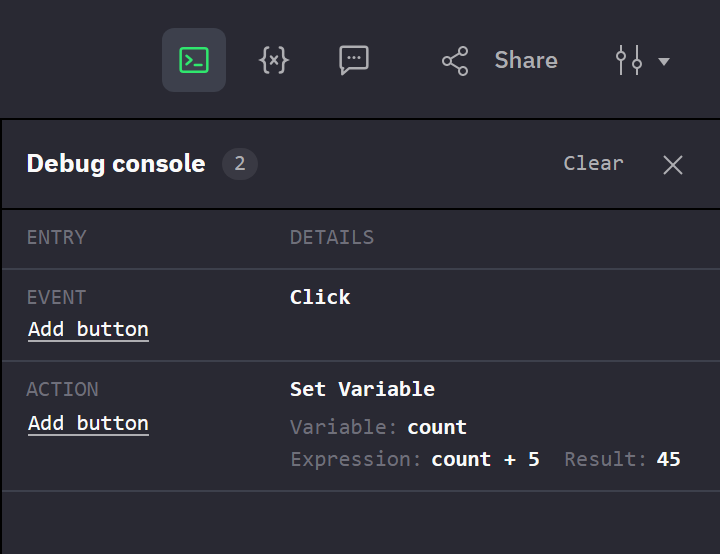
The console lists each event as it fires and each action it runs, in order, newest at the bottom.
- An Event entry names the layer and the event. Check and Toggle add the State the click produced; the size-range events add Property, From, To and the Current value that was measured.
- An Action entry follows for every action in the list, with its parameters as set in the editor: Target, Change to, Transition, Duration and so on. An empty target, variable, input, variant or condition reads
Not set. A Set Variable with an expression adds Result, the value it assigned. The actions of a Conditional branch appear after the Conditional entry, so the entries show which branch ran. - No Event entry after a click: the layer, or the variant showing at that moment, carries no such event, or the event has no actions (→ Events belong to a variant). Bubbling shows as one Event entry per layer that carries the event (→ Order, bubbling and failures).
- Hover a layer name or a Target value to highlight that layer in the preview.
- State switches made by a component behavior, and the gestures of object behaviors, are not logged.
A Log entry is a warning about an expression in an action. It names the action type, not the layer, and shows nowhere else.
| Entry | Meaning |
|---|---|
| Log Set Variable, with the error text of the expression | The expression failed, for example on a variable name that does not exist. The variable is unchanged (→ Set Variable). |
Log Set Variable, The expression result does not match the variable's type. | The expression ran, but its result is not of the variable's type. The variable is unchanged (→ Errors). |
| Log Conditional, with the error text of the expression | The condition failed, and neither Then nor Else ran (→ Conditional). |
The console records only while the side panel is open, on any of its views, and closing the panel empties the log. It keeps the last 200 entries; the number next to the title counts them, and Clear empties the log. The panel reopens with the preview when it was open before, so reload with the panel open to capture what runs on load.
Variables panel
Where: preview header → the braces button (tooltip Variables).
The panel lists every variable of the document, value and expression variables alike, with the value it has in your session at this moment. Another viewer's session has its own values (→ Variables in preview).
- Values are read-only. To start a session from other values, set runtime values in the editor (→ Runtime values).
- A row flashes when its value changes, whether a Set Variable action, an expression that re-evaluated or an edit in the editor caused it. Nothing marks afterwards which variables the session has changed.
- A color shows as a swatch with its hex value. A long value is cut off; its tooltip has the full value.
- A
!after the value marks an expression variable in error. The value shown is its last good one, and the tooltip has the error text (→ Errors).
Validation console
Where: editor → left toolbar → the console icon button, the last in the toolbar (tooltip Validation console).
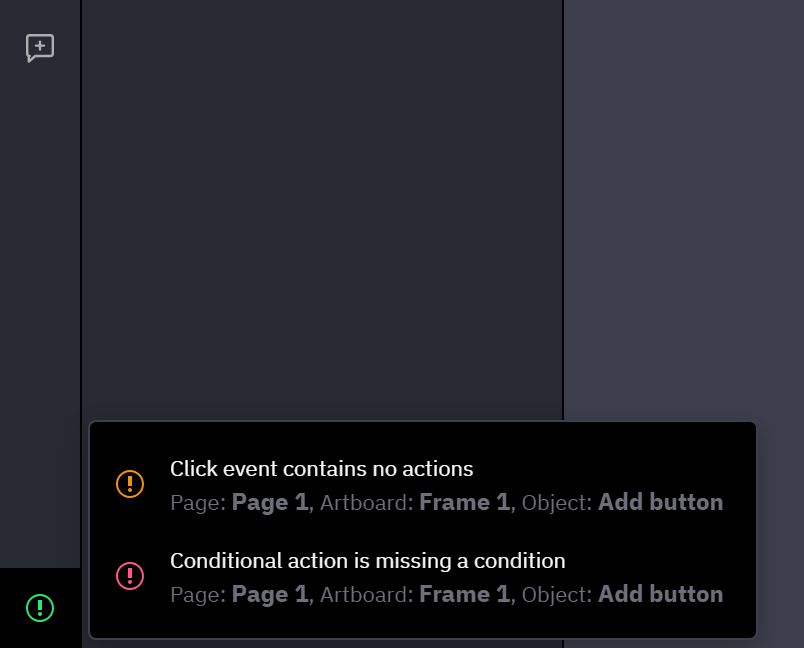
The Validation console lists incomplete events, actions and object behaviors, and expression variables in error, before you open a preview. It does not check the expressions inside Set Variable and Conditional actions, and it does not check bindings; an empty list is not proof that everything works.
- The button is tinted while the list has entries, and carries a red dot when entries were added since you last opened it. With nothing to report, a click shows No validation errors.
- Each entry names the page, the artboard or component set, and the layer. Selecting it selects that layer, brings it into view and opens the Interactions tab, or the Settings tab for a behavior. An entry for a variable opens the Variables panel at that variable.
- Entries follow your edits to events, behaviors and variables. The open list does not update; close and reopen it.
| Entry | Meaning |
|---|---|
Click event contains no actions, for any event | The event's action list is empty, so it does nothing. |
… action is missing a target | Target is empty, often because the target was deleted or moved (→ What an action can target). |
Set Variable action is missing a variable | Variable is empty (→ Changing or deleting a variable). |
Set Component Variant action is missing a source component | Change to is empty. |
Conditional action is missing a condition | If is empty; neither branch runs. |
Set Component Input action is missing an input, Resize action is missing both width and height, Open URL action is missing a URL | Input, both size fields or URL are empty. |
Draggable behavior is missing a handle object | Handle is set to Child object, but Object is empty; the layer cannot be dragged (→ Draggable). |
Sortable behavior can only be applied to flex containers | The frame has no Flex layout; nothing sorts in preview (→ Sortable). |
| Expression error, Expression timed out, Circular dependency, Invalid value, Type mismatch | An expression variable failed and keeps its last good value (→ Errors). |
In preview an incomplete action does nothing and the rest of its list still runs (→ Order, bubbling and failures).
Related
- How interactions run — what an action can reach, in which order lists run, and which variant's events apply.
- Variables — what a preview session holds and when it follows the editor.
- Preview — reloading to restart a session, and what the address carries.