Draggable, Resizable and Sortable objects
Object behaviors make a layer respond to a pointer gesture in preview: Draggable moves it, Resizable resizes it, and Sortable lets viewers reorder the items of a Flex frame. You need them for drag and drop, reorderable lists and resizable panels, which events and actions cannot express. Also called: drag and drop, reorderable list.
For Button, Checkbox, Input, Radio button and Toggle, see component behaviors. For Scrollable and Pannable, see Scrolling in preview.
Adding a behavior
Where: Settings tab → Behaviors → the + button (tooltip Add behavior).
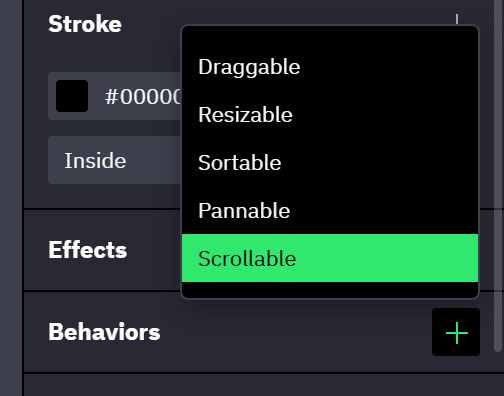
- A layer carries one behavior of each type.
- Draggable and Resizable are offered on every layer. Sortable, Pannable and Scrollable are offered on frames, including artboards, components and instances, and are disabled for every other layer.
- Behaviors run in preview only and fire no events of their own. A Size Enters Range or Size Exits Range event on the layer does react while a viewer resizes it (→ Events and actions reference).
- The Validation console lists a behavior that cannot work: a Draggable without its handle object, or a Sortable on a frame without Flex layout.
Draggable
Where: Settings tab → Behaviors → the + button (tooltip Add behavior) → Draggable.
- The layer is not confined to its parent; a parent with Clip content on cuts it off at its edge.
- With Handle set to Child object, Object lists the layer's direct children. Pressing anywhere inside the chosen child drags the whole layer; pressing the rest of the layer does not start a drag.
- A dragged or resized layer keeps its Constraints. A layer pinned to the right edge stays pinned to it, at the distance where the viewer let go.
Resizable
Where: Settings tab → Behaviors → the + button (tooltip Add behavior) → Resizable.
- There are no visible handles. The pointer turns into a resize cursor within a few pixels of each edge and corner.
- Keep aspect ratio applies to the corners only. Dragging an edge still changes one axis.
Sortable
Where: Settings tab → Behaviors → the + button (tooltip Add behavior) → Sortable.
Sortable goes on the list, not on its items: every direct child of the frame becomes an item a viewer can drag to a new place. The frame needs Flex layout; on a Grid frame or a frame without managed layout nothing happens in preview. Wrapping lists work.
| Mode | While the viewer drags |
|---|---|
| Immediate (the default) | The other items slide aside and leave a gap where the item will land |
| On drop | The items stay put and a line marks where the item will land; the order changes on release |
- An item can be dragged from one Sortable frame into another and stays there after release. While it is over the other frame, that frame's Mode applies.
- Releasing an item outside every Sortable frame puts it back where it started.
With managed layout
- Draggable has no effect on an item of a Flex or Grid frame, because the layout decides where the item sits. To let viewers reorder the items, add Sortable to the parent frame. A child taken out of the layout with the toggle next to its position fields (tooltip Use absolute positioning) drags like any other layer.
- Resizable does not change the size on an axis where the layer is set to Fill or Hug content. Set that axis to Fixed (→ Sizing).
Combining behaviors
One gesture runs at a time, and the press decides which one.
- On a layer that is both Resizable and Draggable, a press near an edge resizes. Every other press is left to Draggable and its Handle setting.
- A Sortable frame takes the gesture from a Draggable or Resizable item inside it: a press on an item always sorts.
- On a frame that is both Sortable and Draggable, a press on an item sorts and a press on the frame outside its items drags the frame.
- Inside a Pannable frame, a Draggable, Resizable or Sortable layer takes the gesture; pressing anywhere else pans.
On instances
- An instance runs the behaviors of its main component and then its own. The inherited ones are not in the instance's list. A button below it, labeled for example 2 inherited behaviors, selects the layer they are defined on; an instance cannot change or remove them.
- For a layer inside an instance the Behaviors section is read-only: the layer runs what the component defines.
- Behaviors belong to a variant, like events: an instance runs the behaviors of the variant it shows. A behavior added on the instance itself runs whatever variant shows (→ How interactions run).
What persists
- A dragged position and a resized size are layer changes of the preview session. They last until the preview reloads, like every other session change (→ Variables).
- A Reset action that targets the dragged or resized layer puts it back to its designed position and size (→ Events and actions reference). Target the layer that carries the behavior, not its handle.
- Reset does not touch the order of a Sortable frame. Reloading the preview restores the designed order.
Related
- Scrolling in preview — the Scrollable and Pannable behaviors.
- Events and actions reference — the Resize action, for a size change that a click triggers.